Create levels
The editor lets you design a level from scratch, or polish the one the AI made from your music. Every platform you place plays a note: you compose while you build.
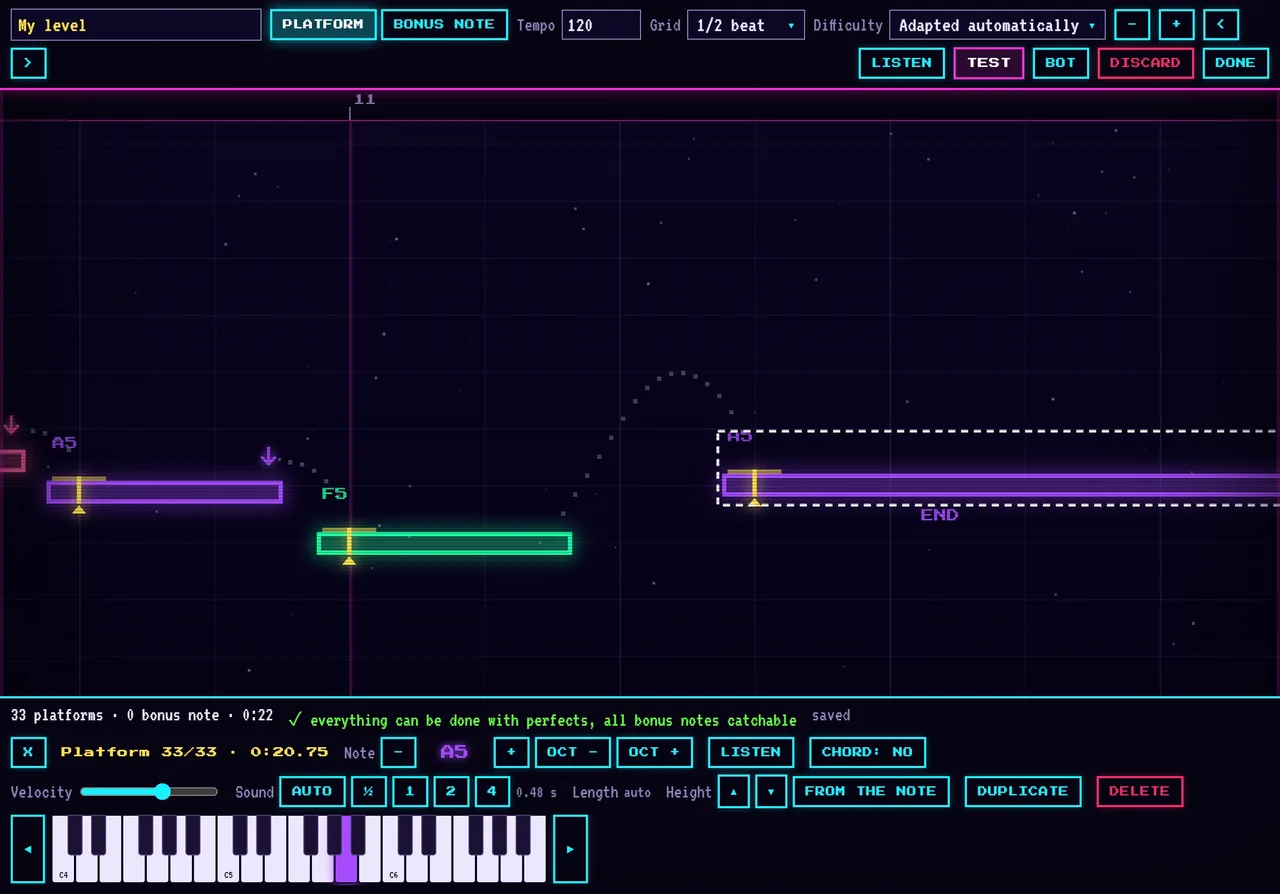
Opening the editor
- Create a level from the menu: start from a blank page.
- Edit a level from "My levels": ideal to fix an automatic transcription. The original music stays available to check that the notes land in the right place.
- Import an exported level (
.json), or a MIDI or MusicXML score.
Tools
| Tool | Key | Use |
|---|---|---|
| Platform | 1 | Click in the grid to place a platform. Then pick its note on the keyboard; drag its right edge to make it longer. |
| Bonus note | 2 | Place a diamond to touch by rolling or jumping, handy for fast notes. "Stack" adds one just above to form a chord. |
| Spike | 3 | In custom difficulty: a spike on a platform, under it or in mid-air. Touching it costs a life. |
Tempo and grid
Enter the song's tempo in beats per minute: the grid lines up with the beats and the cursor snaps to them. You can go down to sixteenth notes, or turn snapping off to place an element to the hundredth of a second. The "Heights from the notes" button moves every platform to the height that matches its note.
Difficulty
- Adapted automatically: you draw the Normal version and the game works out the others. Easy with fewer platforms, Hard with more, Extreme remixed with spikes.
- Custom: your level is played exactly as you made it, in the difficulty you choose (Easy, Normal, Hard or Extreme). You can then place your own spikes.
Listen, test, check
- Listen (Space): plays the notes from the yellow cursor, with the original music if you want to check the timing.
- Test (T): plays your level from the cursor. At the end or when paused, you go back to the editor.
- Bot: the robot plays your level. Platforms it shows in red are impossible to reach: move them.
A line at the bottom of the screen always tells you whether everything is doable with all PERFECTs and whether every bonus note can be collected. The level is saved automatically; "Undo" and "Redo" keep the history of your changes.
Publish for the community
A finished level can be published in the Community tab. Other players can then play it, and it gets its own leaderboard. Only the notes are shared, never your original music. Published levels under four minutes can also be drawn at random in online games.
Ideas to get started
- Recreate a simple melody you know by heart, in quarter notes, at 100–120 BPM.
- Leave at least half a beat between two platforms so the level stays readable.
- Save big height changes for the strongest moments of the song: they require a held jump.
- Let the bot play, then test it yourself: a good level plays as much by ear as by eye.